
NZ address autocomplete
NZ address autocomplete for forms and checkouts
Add New Zealand address autocomplete to web forms, checkout flows, onboarding screens, and internal tools with the StreetKit JavaScript widget.
What it does
Searches NZ physical addresses
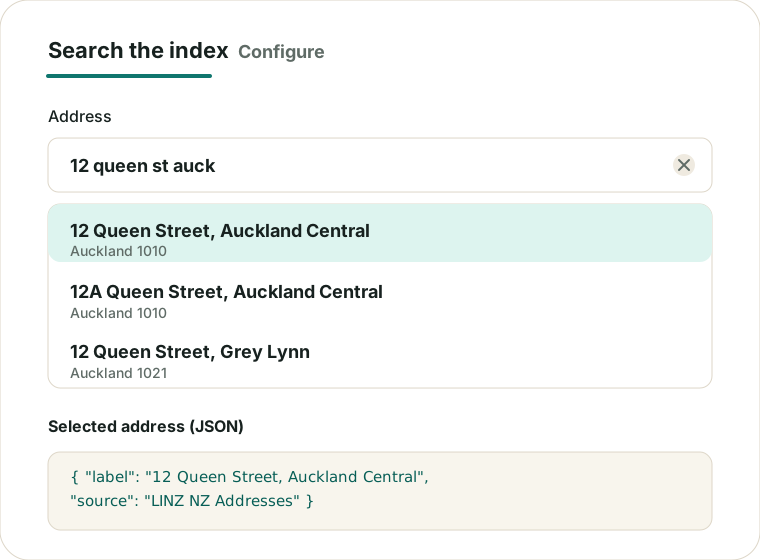
The widget attaches to an address input, loads StreetKit suggestions, and ranks likely NZ address matches quickly.
Returns structured fields
On selection, your form receives a label, address components, source metadata, and coordinates when available.
Leaves control with your form
Your site still owns validation, submission, checkout rules, and manual address fallback if suggestions are unavailable.
Uses the browser widget
Start with hosted CSS and JavaScript, then configure public mode or a registered site ID.
Who it is for
- Developers adding NZ address search to normal HTML forms.
- Ecommerce teams improving checkout address entry.
- Agencies and product teams building SaaS onboarding flows.
- Internal tools that need structured physical address capture.
Live demo or link to demo
Try the current homepage demo, then jump to the full Address Autocomplete section for the focused workflow.
Copy-paste install snippet
<link rel="stylesheet" href="https://streetkit.smp.kiwi/widget/streetkit.css">
<script src="https://streetkit.smp.kiwi/widget/streetkit.js" defer></script>

<label for="address">Address</label>
<input id="address" name="address" autocomplete="street-address">

<script>
  window.addEventListener("DOMContentLoaded", () => {
    StreetKit.init({
      input: "#address",
      publicMode: true,
      indexBaseUrl: "https://index.streetkit.smp.kiwi/public/v1",
      limit: 8,
      onSelect(address) {
        console.log(address);
      },
      onError(error) {
        console.warn("StreetKit error", error.code);
      }
    });
  });
</script>
For production registered access, request a public StreetKit site ID and use the matching customer index path.
Structured address output example
{
  "id": "linz:123456",
  "label": "12 Queen Street, Auckland Central, Auckland 1010",
  "components": {
    "unit": null,
    "number": "12",
    "street": "Queen Street",
    "suburb": "Auckland Central",
    "city": "Auckland",
    "postcode": "1010",
    "territorialAuthority": "Auckland",
    "country": "NZ"
  },
  "location": {
    "lat": -36.8485,
    "lon": 174.7633
  },
  "source": {
    "provider": "LINZ",
    "dataset": "NZ Addresses",
    "layer": "123113",
    "licence": "CC BY 4.0"
  },
  "confidence": {
    "score": 186,
    "matchType": "autocomplete"
  }
}
See the address object format for field guidance and unsupported fields.
Why StreetKit
- Built for NZ address-entry workflows rather than generic place search.
- Designed for fast, reliable suggestions and explicit field mapping.
- Designed for simple script-tag installs and explicit field mapping.
- Documents product boundaries instead of implying postal verification.
Data-minimising behaviour
StreetKit only needs the typed address query for autocomplete. It does not need names, emails, phone numbers, cart data, payment details, account IDs, or full form payloads.
Field mapping is write-only from StreetKit's perspective: the widget fills configured address fields after selection and does not inspect unrelated form controls.
Read the privacy notes for the current data-minimising address search flow.
Data/source transparency
StreetKit v1 is based on LINZ NZ Addresses where available and exposes source metadata on selected address objects. Normal web requests may appear in standard hosting logs.
Review data sources and attribution before production launch.
Limitations
- StreetKit v1 focuses on physical NZ address autocomplete.
- It is not address verification and does not certify that an address is deliverable.
- It does not provide NZ Post delivery certification.
- It does not provide DPID, PO Boxes, Private Bags, or postal-vs-physical matching.
- Your form should keep manual address entry available if suggestions cannot load or respond quickly.